
Understand How Work
Actually Gets Done
Pulse Workforce Insights monitors application usage, keyboard activity, and device activity across your team's computers — giving you clear visibility into where time is being spent.
How It Works
Visibility Without Micromanagement
Install the Monitor
A lightweight agent is installed on each monitored device. It runs in the background and reports activity data to your Pulse dashboard.
Activity Is Recorded
Application usage, active window time, keyboard activity, and mouse movement are tracked and aggregated by device and time period.
Review Your Dashboard
See productivity trends, most-used applications, active vs. idle time, and per-device summaries — all in one place.
See It In Action
Activity Across Your Entire Team
Multi-User Activity Graph
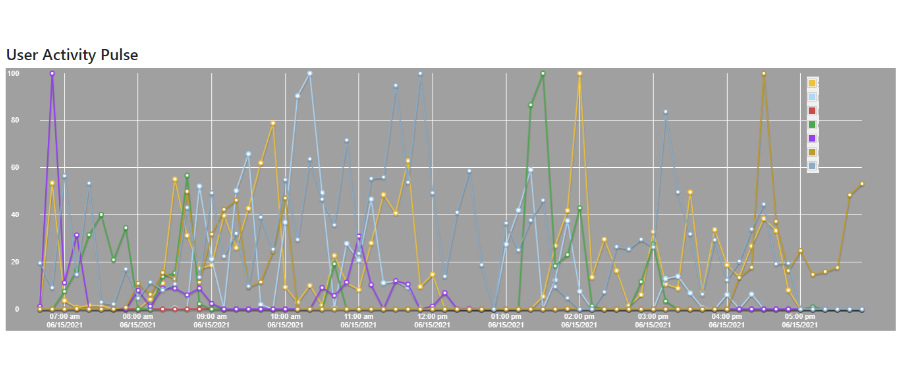
Color-coded activity lines per employee — see who is active, when, and for how long throughout the workday.
Key Benefits
What You Can Learn
Productivity Trends
Identify peak productivity hours and days. Understand when your team is most effective and schedule accordingly.
Application Usage
See which applications are being used and for how long. Discover tool adoption, underutilization, and unauthorized software.
Remote Team Oversight
Maintain visibility over remote and hybrid teams without constant check-ins. Objective data replaces guesswork.
Legal Obligations & Responsible Use
Employee monitoring is legal in most jurisdictions when conducted transparently and for legitimate business purposes, but the specific requirements vary by country, state, and employment type. As the account administrator, you are solely responsible for complying with all applicable laws before deploying monitoring in your organization.
Pulse provides the monitoring tools — compliance with applicable employment, privacy, and labor law is your responsibility. We recommend consulting with an employment attorney before deploying monitoring in any new jurisdiction. See our Privacy Policy and Terms of Service for platform-level obligations.
Pricing
$3.00 per Device per Month
Only active monitored devices are billed. Add or remove devices at any time.
FAQ
Workforce Insights Questions
Start Monitoring Your Workforce Today
30-day free trial. $3.00/device/month after trial. Cancel anytime.
Create Free Account →Credit card required • Not charged until day 31