
The Analyst You Never Had to Hire
Pulse AI connects to your spreadsheets, databases, inbox, and bank statements, then answers questions, builds charts and forms, and takes action — all in plain English. No dashboards to build, no report queue to wait in.
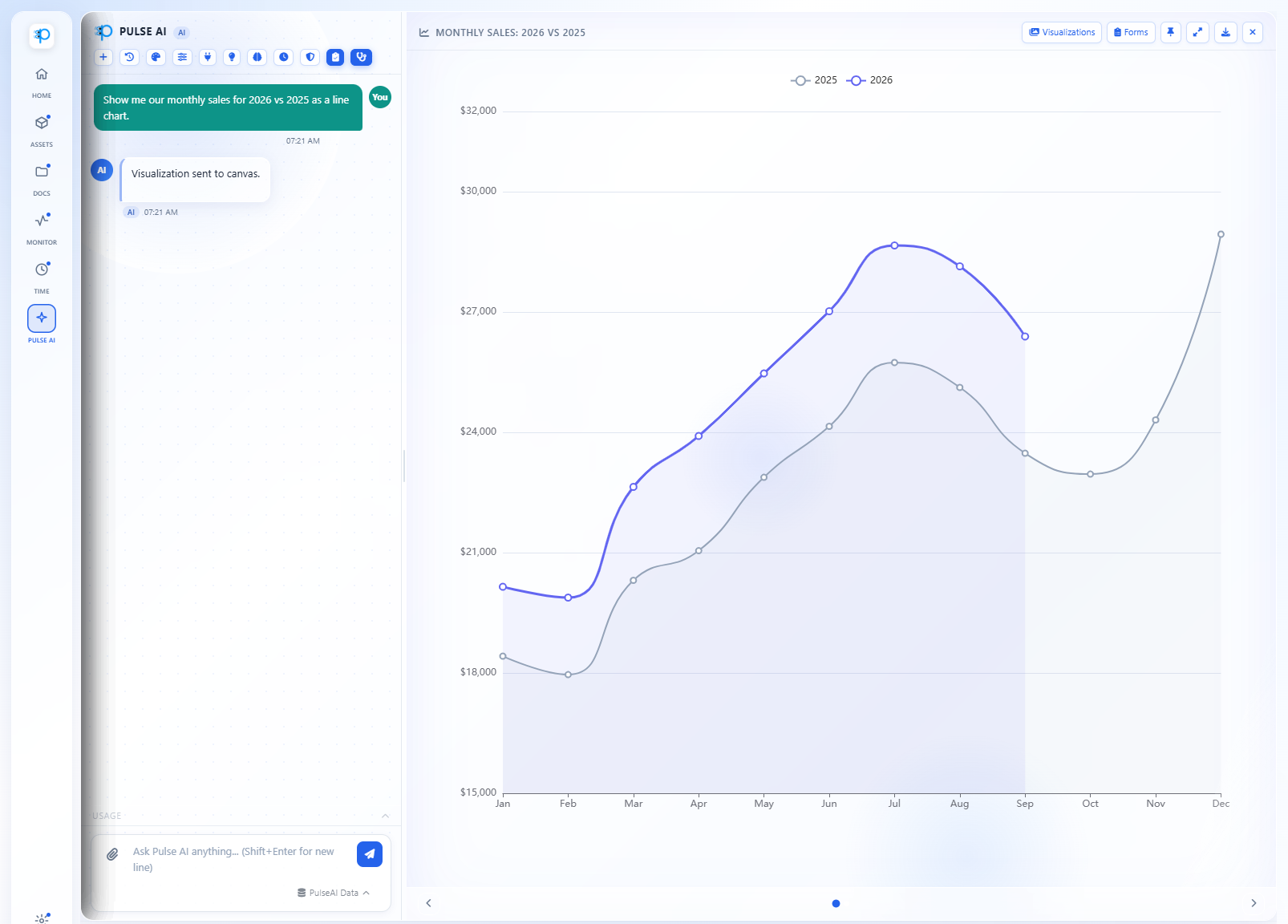
Ask in plain English and get a chart back, built from your own data.
Why Pulse AI
Ask Your Business a Question. Get a Real Answer.
Pulse AI connects straight into the tools you already run — your spreadsheets, inbox, databases, and bank statements — and works like an analyst on your team, not a search bar. It answers, it watches, and it acts.
Ask Instead of Build
Skip the BI dashboard. Ask "which vendors did we pay the most last quarter?" in plain English and get a chart back — not a support ticket to IT.
One AI, Every System
Built-in connectors for your spreadsheets, inbox, databases, calendar, and the web mean Pulse AI already speaks the language of your business — no setup marathon required.
It Watches, So You Don't Have To
Proactive background discovery flags stale data feeds and surfaces insights before you even think to ask.
Automate Without Code
Schedule a recurring task — "email me a summary of overdue invoices every Monday at 8am" — with zero scripting.
Pay for What You Use
Transparent usage-based pricing billed in small increments, with a monthly cap for each person and spend alerts at the amounts you choose.
Security Built In, Not Bolted On
A separate AI database for your account, encrypted connections to your bank statements and inbox, required multi-factor authentication, and role-based permissions.
Pulse AI
Talk to Your Data
Ask a question in plain English. Pulse AI works it out using your actual spreadsheets, databases, and documents, shows you each step as it goes, and checks its numbers before you see them.
Remembers What Matters
Each conversation keeps its context, and Pulse AI remembers the facts you tell it — “our fiscal year starts in July” — in every conversation after. Ask it to forget something and it does.
Double-Checked Before You See It
Before a report, chart, or table reaches you, Pulse AI checks its totals, figures, names, and dates against the data it actually pulled and corrects the mistakes it finds. On by default.
Full Visibility Into Every Step
A live status line shows what it's doing — querying your data, building a chart — and a Cancel button stops it mid-task.
Asks Before It Assumes
When a question is ambiguous, Pulse AI asks a clarifying question right in the chat instead of guessing and handing you the wrong answer.
Reads Your Documents
Upload PDFs, Word (.docx) and Excel files, images, and CSVs — up to 500MB at a time — and Pulse AI reads, summarizes, and analyzes them right in the conversation.
Charts on Demand
Ask for a bar, line, or pie chart, a table, KPI cards, or a full report, and it appears right beside the conversation — ready to pin or download as an image.
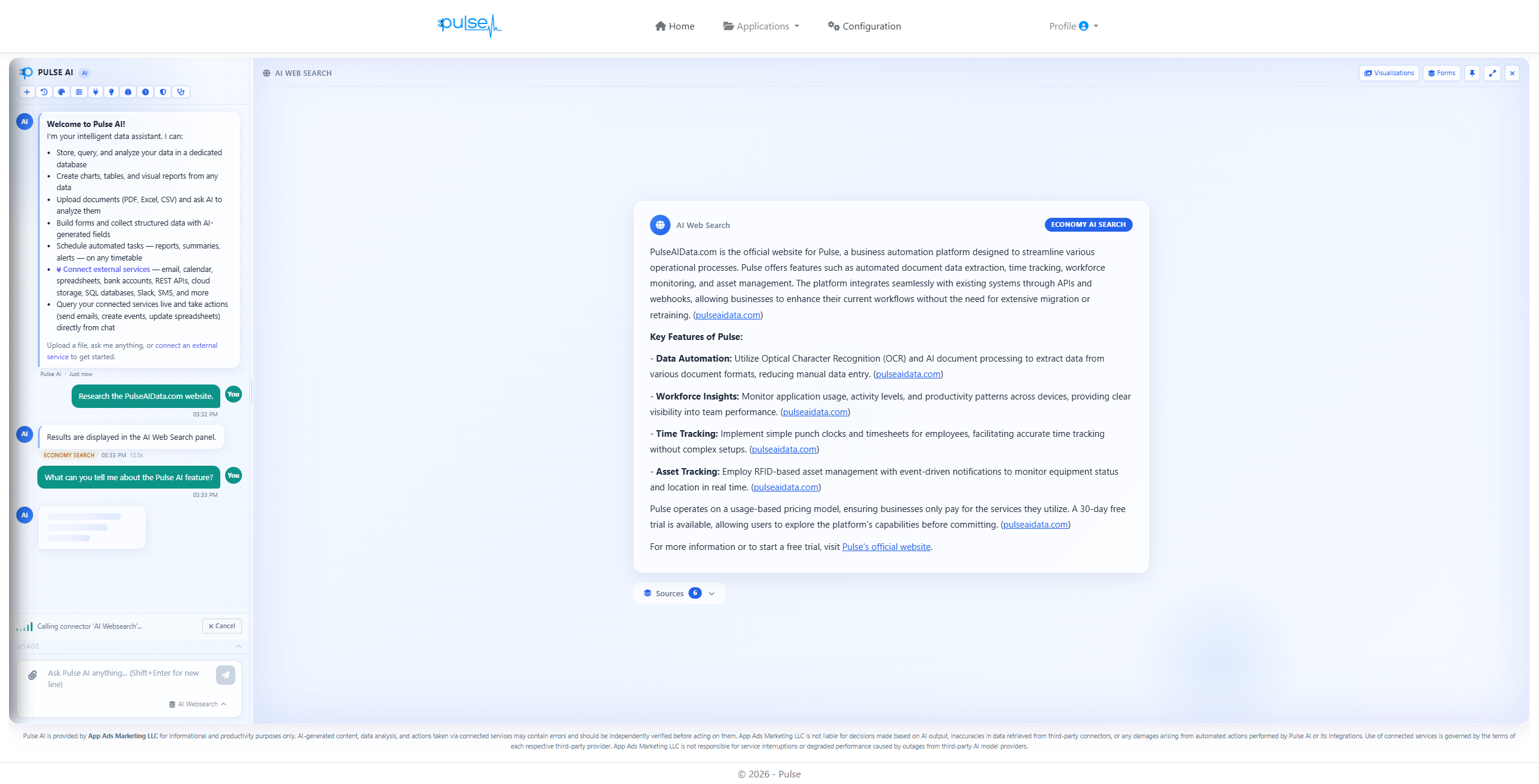
Full visibility mid-task — a live connector-call status with a cancel control, then a sourced answer with citations. Nothing happens silently.
Beyond the Answer
Turn Answers Into Tools
Pulse AI doesn't stop at a reply. Ask it for a data-entry form, pin the charts you want to keep watching, and load whole spreadsheets you can keep asking questions about.
Ask for a Form. Get a Form.
Say “give me a form to log equipment returns” and Pulse AI builds it on the spot — required fields, dropdowns filled from your own data, and line items with running totals. Every entry is saved where you can ask questions about it later, or straight into your own SQL database.
- Catches mistakes: a one-click review flags likely typos, bad email addresses and phone numbers, and impossible dates, and Pulse AI warns you when a new entry looks like one you already have.
- Change it by asking: “add a notes field” or “make the date required.”
- Saved and reusable: name, tag, and reopen your forms anytime.
Pin It. It Stays Current.
Pin any chart, table, or KPI card to your Pulse home page. Ones that come straight from your data refresh each time you open the page, and charts from connected sources can refresh on visit, daily, or weekly.
Load a Spreadsheet. Keep Asking.
Upload a spreadsheet, CSV, or PDF table and Pulse AI turns it into a table you can question anytime. Big files show an estimated cost first, load in the background, and get common problems like mixed date formats fixed along the way.
Beyond What's Already in Pulse
Connect Everything You Already Use
Depending on the connector, Pulse AI can stream its data in on a schedule, query it live in the middle of a conversation, take action — like posting to Slack or adding a spreadsheet row — or run a scheduled AI task against it.
Financial
Upload bank statements in OFX, QFX, or CSV format and Pulse AI reads the real transactions — or pair it with AutoPull to download them for you. Direct bank connections are coming soon.
Productivity & Cloud Data
Google Sheets, Airtable, and Google Calendar — read and update them without leaving the conversation.
Communication
Read and send email from Gmail, Outlook, or any IMAP inbox, post messages to Slack, or reach people instantly with Twilio text messages.
Databases & Developer Tools
Query MySQL, PostgreSQL, or SQL Server in plain English, poll any REST API, receive webhooks, watch an RSS feed, or move files over FTP/SFTP.
Search
Pull live results from the open web, with sources cited, so answers aren't capped by what's already in your systems.
Proactive Intelligence
It Finds Things Before You Ask
Pulse AI doesn't sit around waiting for a question. It's already scanning your data, connecting the dots, and flagging what needs your attention.
A Fresh Pass Every Six Hours
Runs on its own — no one has to open the app for it to be working.
Gets Sharper the More You Use It
Learns which kinds of suggestions you act on and which you dismiss, and adjusts what it shows you. Give it a goal and it puts the suggestions that serve it first.
Signal, Not Noise
Low-confidence guesses are filtered out before they reach you, and a suggestion you've passed over a few times gets out of your way.
Turns Habits Into Automations
Keep asking the same question? Pulse AI notices and offers to set it up as a scheduled task, already drafted for you.
Watches Your Data Pipes Too
If a connector starts failing or goes days without a successful sync, Pulse AI flags it before the stale data becomes a real problem.
Your Monday-Morning Briefing
Every Monday, a short email recaps the suggestions you acted on that week. Quiet week? No email. One click turns it off.
Automate the Busywork
Set It Once. It Runs Forever.
Pulse AI doesn't have to wait for you to ask. Give it one instruction, put it on a schedule, and it keeps working your data around the clock — no chat window required.
Define the Task Once
"Summarize this week's overdue invoices and email me the list" — saved as a repeatable task, ready to run whenever you need it.
Set a Real Schedule
Hourly, daily, weekly, monthly, or one time — in your own time zone. Need something unusual? Custom schedules work too.
Results Land Without Logging In
Delivered by email, text message, or right inside Pulse, on schedule — no need to open the app and go looking for it.
Test It Before You Trust It
Run any scheduled task on demand first. See exactly what it produces before you ever let it run unattended.
Quiet When There's Nothing to Report
Set up an alert like “tell me when an invoice goes 30 days overdue” and you only hear from it when there's something to tell you.
Security & Trust
Built for Businesses That Can't Compromise on Data Security
Pulse AI works with your bank statements, your databases, your inbox — the data you can least afford to expose. So it's built with the separation, encryption, and access controls to match.
Your Own AI Database
Your conversations, memories, and imported data live in a database created just for your account — not in a shared pool with other customers.
Encrypted Connections
Data from your bank statement, email, Slack, spreadsheet, and Airtable connections is encrypted with AES-256-GCM, using keys specific to your account.
Multi-Factor Authentication
Sign in with a code by email, text message, or authenticator app, with recovery codes as a backup. It's required before anyone can connect an outside system.
Role-Based Permissions
Decide who can use Pulse AI, see account-wide costs, set spending caps, and manage data security — and limit specific tables and forms to specific roles.
Asks Before It Acts
In a conversation, Pulse AI shows you what it's about to do and waits for your OK before it sends a message, writes to a database, or edits a spreadsheet.
History That Cleans Itself Up
Conversation history is deleted automatically after 30 days, so old questions don't pile up. Files and data you import stay until you remove them.
Pricing
No Confusing Tiers. Pay Only for What You Use.
Pulse AI runs on the same per-unit pricing as the rest of Pulse — no seats, no flat fees, no paying for capacity you never touch.
$0.05 per AI Unit
Questions, charts, scheduled tasks, background suggestions, and accuracy checks all run on AI units. Billed monthly. Nothing hidden.
$5 Off to Start
Paid Pulse accounts get $5 off their first Pulse AI invoice, so your first $5 of usage is on us.
A Cap for Each Person
Set a monthly spending cap for each person. Once someone reaches it, Pulse AI stops taking their new chat requests until next month.
Spend Alerts You Choose
Pick the dollar amounts — say $10, $25, and $50 — and each person sees a heads-up in Pulse as their spending crosses them.
Itemized Down to the Message
Billed on the same day and card as the rest of Pulse, with a usage dashboard that shows cost by person and by message.
Who It's For
One AI Analyst for Everyone Who Needs Answers From Your Data
You don't need a data team. You need someone to ask.
Operations Teams
Stop stitching together spreadsheets and bank statements to answer one question. Ask Pulse AI in plain English and get the answer — not a report you have to wait on.
Finance Teams
Upload your bank statements — or let AutoPull download them — and ask about transactions, vendors, or cash flow. No pivot tables, no manual reconciliation.
Small Business Owners
You don't have a data analyst on staff. You don't need one — Pulse AI gives you the same insights, the moment you ask.
IT-Savvy Teams
Query your own SQL databases in natural language instead of writing another ad hoc report. Pulse AI speaks your schema.
Every Pulse User
Already tracking assets, time, or documents in Pulse? That data is just sitting in tables. Pulse AI turns it into answers.
FAQ
Pulse AI Questions
Pulse AI Is Live. Try It Free Today.
Get $5 off your first Pulse AI bill, then pay only for what you use — no contracts, no seats.
Credit card required — won't be charged until day 31. $5 off your first Pulse AI invoice.